Explaining a package
When a violation shows up on a package you've never heard of, three levels deep in your dependency tree, the
normal scan output doesn't tell you what to do about it. The explain command answers "what is this, why is
it here, and what did policy decide about it?" for a single package:
packageguard explain Newtonsoft.Json --path <path-to-solution-file-or-project>
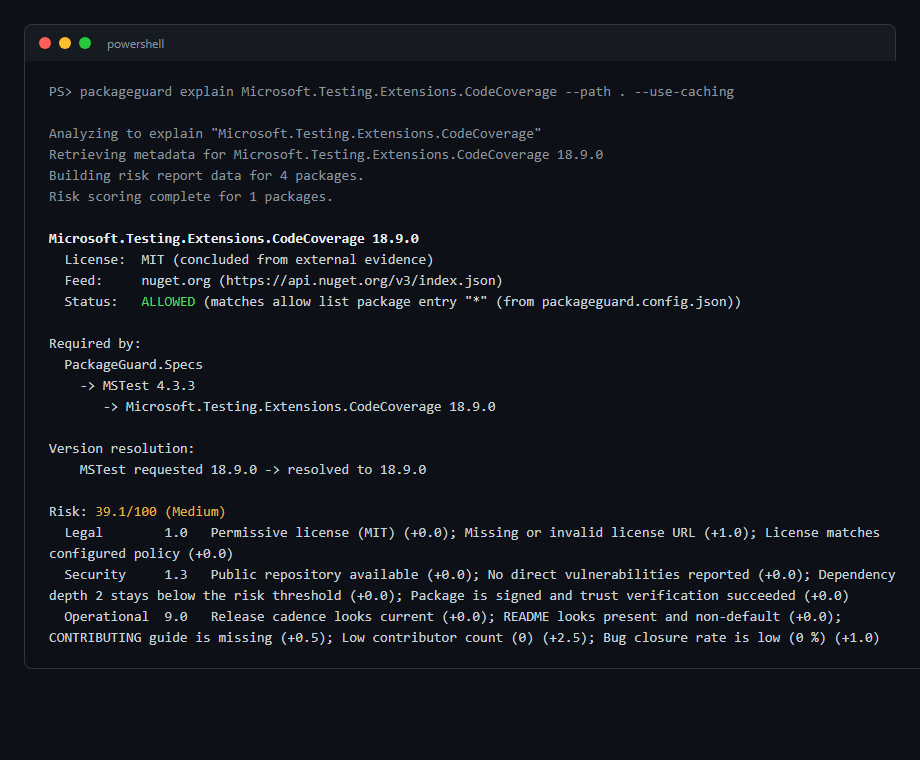
The package name doesn't need to be exact - a partial or misspelled name is matched against every package found in the solution, and PackageGuard suggests candidates when it can't resolve one unambiguously. If a package resolved to more than one version across your projects, pass the version as a second argument to pick one:
packageguard explain Newtonsoft.Json 13.0.3 --path <path-to-solution-file-or-project>
explain prints:
- Identity - the resolved version, license (and whether it was declared by the package's own metadata or concluded from external evidence), and the feed it came from.
- Policy verdict - whether the package is
ALLOWEDorDENIED, naming the specific allow/deny rule that decided it (a package entry, a license entry, a feed entry, or the prerelease flag) and, when the rule came from a discoveredpackageguard.config.jsonor.packageguard/config.jsonfile, which file it was. If different projects in the solution apply different policies, each gets its own verdict line. ADENIEDverdict is followed by aResolveline that suggests how to fix it, such as adding ariskExceptionsentry. - Dependency path - for NuGet packages, every direct dependency that transitively pulls the package in, down to the exact hop, plus which version range each requester asked for and what version was actually resolved. This is the part that turns "some package I've never heard of is blocking my build" into "go upgrade this one direct dependency."
- Risk breakdown - the same per-factor Legal/Security/Operational scores and rationale used by the risk metrics HTML report, shown inline.
Unlike analyze, explain takes the path to your solution or project through the --path (-p) option,
because its first argument is the package name.
explain only fetches risk signals for the resolved package and its own dependencies, not for every package
in the solution. A single lookup stays fast, even on a large codebase. It also reads the
cache if one exists, but never updates it. Run
packageguard . --use-caching first, and explain runs almost instantly. That makes it useful to run
interactively, instead of only reading the HTML report.
Known limitation: dependency-path resolution is currently NuGet-only, for the same reason --sbom's
dependency graph is - npm, yarn, and pnpm lock-file parsing doesn't yet capture a real parent-child graph.
For those ecosystems, explain falls back to listing the projects that reference the package.