Introduction
PackageGuard is a fully open-source CLI tool that keeps your open-source supply chain honest. It scans the NuGet, npm, pnpm and Yarn dependencies of your codebase, enforces allow- and deny-lists for licenses, packages and versions, scores every package's legal/security/operational risk, and can emit a standards-compliant SBOM — all from a single, cacheable command that fits into any CI pipeline.
What can it do?
At a glance, PackageGuard can:
- Scan NuGet, npm, pnpm and Yarn dependencies across an entire solution or codebase in one run, direct and transitive alike
- Enforce allow- and deny-lists for open-source licenses, specific packages, and package versions, discovered hierarchically across solution-, project- and repository-level configuration files
- Resolve licenses from NuGet/npm metadata, GitHub repositories, and downloaded license text through a chain of fetchers, falling back gracefully when a source doesn't have an answer
- Explain a single package on demand (
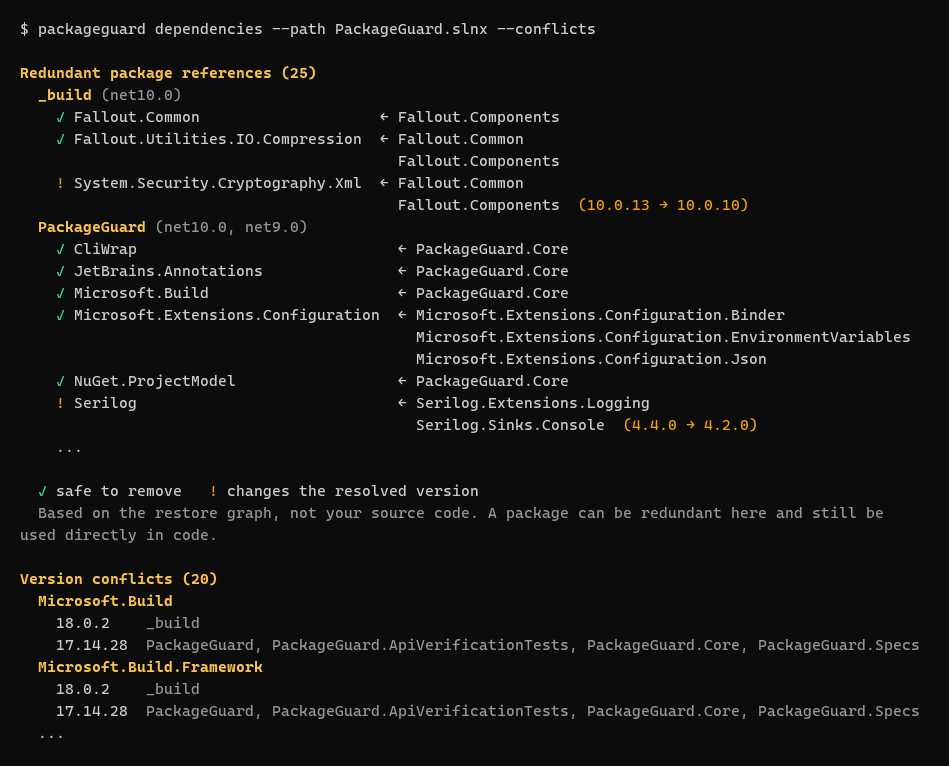
packageguard explain <package>, with fuzzy name matching) - its dependency path, how its version was resolved, the exact policy rule and configuration file that allowed or denied it, and its risk breakdown - Find redundant package references and version conflicts with
packageguard dependencies- a package that a referenced project or another package already brings in, or one that resolves to different versions in different projects - working offline from the restore output - Score every package's risk across three dimensions - Legal, Security and Operational - via
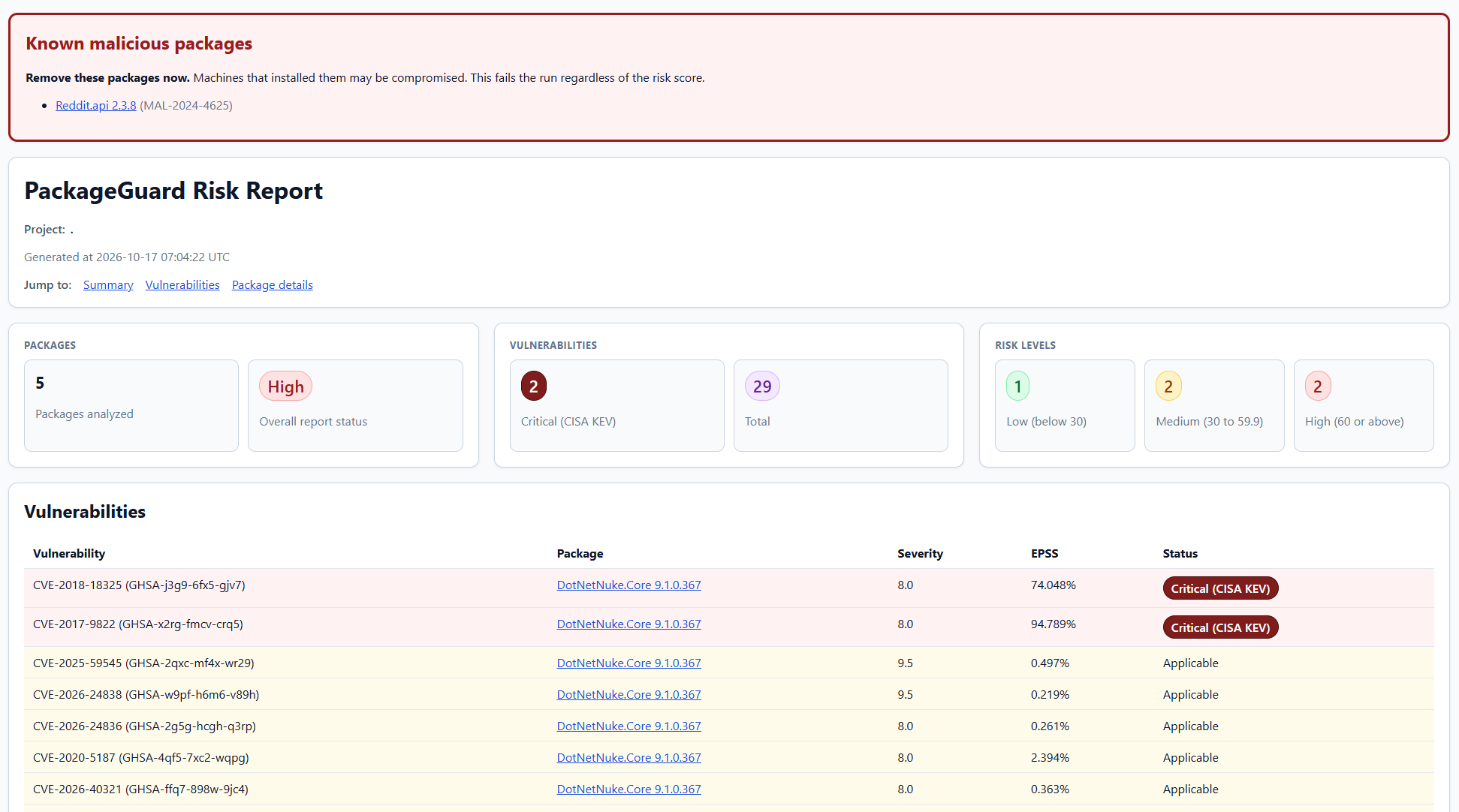
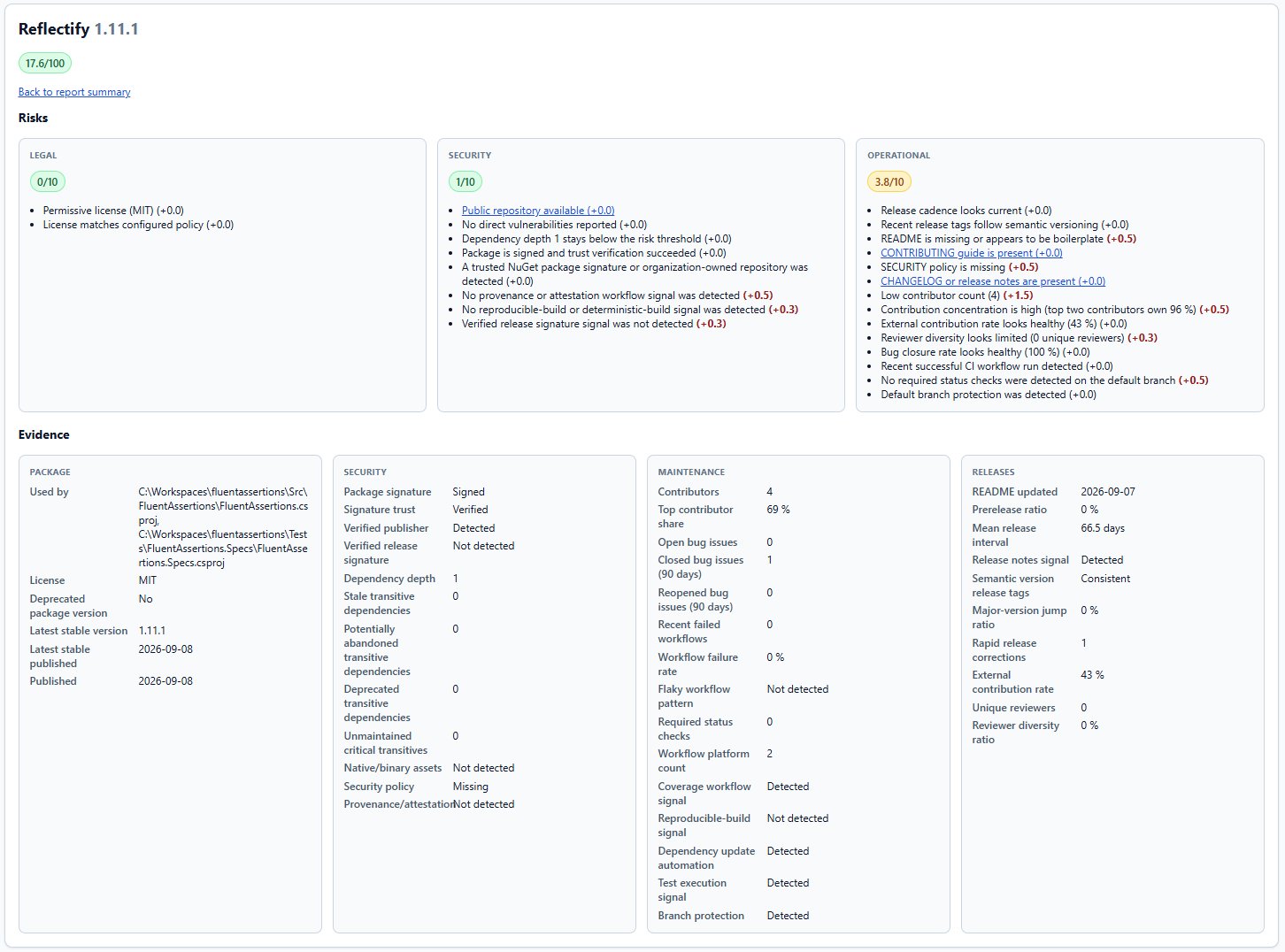
--report-risk, weighing signals such as license compatibility, known vulnerabilities (OSV, with EPSS and CISA KEV exploit data), maintainer activity, package signing, release cadence, and dozens more, and list the dependency hygiene findings in the same report - Block known malicious packages (OSV
MAL-advisories) in every risk run, and report vulnerabilities on their own in the HTML report, where each one can be marked as not applicable with a reason and a review date - Back every risk score with evidence, not just a number: each package card in the HTML report has a dedicated Evidence section with collapsible, collapsed-by-default panels naming the exact packages, versions, GHSA/OSV vulnerability ids and release dates behind its rationale, so you can see why a package scored the way it did without digging through logs
- Produce a colored console summary, a self-contained HTML report you can open in a browser, and a SARIF file for surfacing violations and risk findings directly in GitHub code scanning
- Generate a standards-compliant Software Bill of Materials (SBOM) in CycloneDX or SPDX JSON format via
--sbom, complete with purls, declared-vs-concluded license evidence, and a direct/transitive dependency graph - Enrich that SBOM with vulnerability data from OSV when
--sbomis combined with--report-risk - Cache package, license and risk data (
--use-caching) - including GitHub responses and per-repository risk profiles - to keep repeated scans and CI runs fast, with configurable cache freshness (--risk-cache-max-age-hours,--refresh-risk-cache) - Run as a .NET global tool or a portable, cross-platform (Windows/Linux/macOS) deployment - no CI-specific plugin required
The HTML risk report that --report-risk generates, here for PackageGuard itself:
Every package gets its own details, with the legal, security and operational rationale behind its score:
Here is the dependencies command run on PackageGuard itself:
Commands
PackageGuard has four commands. Running packageguard <path> without a command is the same as packageguard analyze.
| Command | What it does |
|---|---|
analyze | Checks your NuGet and npm dependencies against the allow- and deny-lists, and optionally scores risk and generates an SBOM. See Usage. |
explain <package> | Shows why a package is present and how it was evaluated. See Explaining a package. |
dependencies | Finds redundant package references and version conflicts, offline. See Redundant references and version conflicts. |
init | Scaffolds a configuration from the licenses you actually use. See Getting started with init. |
What's so special about that?
I've noticed that the commercial solutions for this are usually very expensive and have functionality that smaller companies may not need. Hopefully this little tool fills the gap between tools like GitHub's Dependabot and expensive commercial products like Blackduck, SNYK and others.
Who created this?
My name is Dennis Doomen and I'm a Microsoft MVP and Principal Consultant at Aviva Solutions with 28 years of experience under my belt. As a software architect and/or lead developer, I specialize in designing full-stack enterprise solutions based on .NET as well as providing coaching on all aspects of designing, building, deploying and maintaining software systems. I'm the author of several open-source projects such as Fluent Assertions, Reflectify, Liquid Projections, and I've been maintaining coding guidelines for C# since 2001.
Contact me through Email, Bluesky, Twitter/X or Mastodon.
Where to next?
- Installation - install the global tool or the portable deployment
- Configuration - define your allow- and deny-lists
- Usage - run a scan and read the results
- Explaining a package - see why a specific package is present and how it was evaluated
- Redundant references and version conflicts - clean up package references you do not need
- Risk Metrics - score packages on legal, security and operational risk