Risk Metrics
PackageGuard also includes a risk and quality assessment system to help you evaluate the health of every package in your project. Use the --report-risk flag to generate a compact console summary plus a detailed HTML report and a companion SARIF file:
packageguard --report-risk <path-to-project>
The console output shows every package with an overall score and three color zones:
- 🟢 Green (
0.0-29.9) - low risk - 🟡 Yellow (
30.0-59.9) - medium risk - 🔴 Red (
60.0-100.0) - high risk
The overall score is weighted instead of averaged:
- Legal Risk (
20%) - Security Risk (
45%) - Operational Risk (
35%)
Each dimension is scored from 0 to 10, and the weighted total is scaled to 0 to 100.
Risk scores aren't just for reporting - your configuration can deny packages that exceed a risk threshold, minimum package age, or OSV severity cap, with documented exceptions for accepted-risk packages.
Vulnerability indicators
Known vulnerabilities come from OSV and drive most of the security score. The HTML report shows them as separate indicators, so you can tell a package that is vulnerable itself from one that only inherits a vulnerability:
- Direct vulnerabilities - the number of advisories that affect the package version you use, with the maximum severity. The advisory ids are listed in the package's Evidence section.
- Transitive vulnerabilities - advisories in the dependencies beneath the package. The Evidence section names each vulnerable dependency, its version and the advisory ids.
- Fix availability - whether a fixed version already exists, so you know if upgrading solves it.
- Fix speed - the median time between publication of an advisory and the update that addresses it.
At report level, the HTML report shows vulnerabilities as their own concept, on top of how they raise the Security score:
- A full-width red block lists any known malicious packages at the very top.
- Below the title, three blocks show the packages analyzed with the overall report status, the critical (CISA KEV) and total vulnerability counts, and the number of packages per risk level.
- A Vulnerabilities table lists every vulnerability, with the CISA KEV ones first. Rows are red for CISA KEV, yellow for vulnerabilities that still apply, and green for the ones you marked as not applicable with a vulnerability exception.
In the package details, the vulnerability count is shown next to the risk score.
Exploit data. For every CVE alias of an OSV finding, PackageGuard looks up the EPSS probability of exploitation within 30 days and whether the CVE is on the CISA KEV list. A KEV vulnerability adds a heavy penalty (+3.0) to the Security score, and the EPSS score weighs vulnerabilities of the same severity (up to +1.5). Both values appear in the HTML report and in the SARIF properties. Use denyKnownExploited to fail the build on a KEV vulnerability. If either feed can't be reached, PackageGuard logs a warning and continues without that data.
Malicious packages. An OSV advisory whose ID starts with MAL- (from the OpenSSF Malicious Packages data) is not treated as a normal vulnerability. Whenever risk data is collected, a package with such an advisory always fails the run, regardless of its risk score, policy or risk exceptions, and --treat-deny-as-warning doesn't downgrade it. It is listed first in the console output, in its own section at the top of the HTML report, and as a packageguard/malicious-package result at SARIF level error.
You can also gate on these indicators. A policy can deny
packages whose worst OSV severity exceeds a cap you choose, or that have a vulnerability on the CISA KEV list (denyKnownExploited).
What gets measured?
PackageGuard combines package metadata, repository evidence, workflow signals, dependency-graph data, signing checks and OSV vulnerability intelligence.
Not every package exposes every signal. PackageGuard uses the evidence it can find and scores missing or weak signals conservatively.
Legal risk
- License presence - missing or unknown licenses are treated as high legal risk.
- License type - restrictive licenses (for example GPL/AGPL/SSPL/BUSL-style terms) increase risk more than permissive licenses such as MIT, BSD or Apache-2.0.
- Weak copyleft detection - licenses such as LGPL or MPL are scored as lower legal risk than strong copyleft, but still higher than permissive licenses.
- License URL validity - missing or invalid license URLs add a smaller amount of legal risk because they make the package harder to audit.
- Policy compatibility - if the detected license conflicts with your configured allow/deny policy, legal risk goes up further.
Security risk
- Repository availability - packages without a public source repository are treated as riskier because the code and maintenance practices are harder to inspect.
- Direct vulnerability count - known vulnerabilities for the package itself increase security risk.
- Transitive vulnerability count - vulnerable dependencies beneath the package also contribute to the score.
- Maximum vulnerability severity - a small number of severe findings can outweigh a larger number of low-severity ones.
- Recent vulnerability fix activity - a package with recent security fixes may indicate active vulnerability handling, but also recent exposure.
- Available fixes - if a known vulnerability already has a fix, the report highlights that separately.
- Median time to fix vulnerabilities - slow fix times indicate weaker security response maturity.
- Dependency depth - deeper dependency chains increase attack surface and supply-chain complexity.
- Pre-1.0 dependencies - reliance on unstable pre-1.0 packages adds some supply-chain risk.
- Package signing - unsigned packages or packages with failed trust verification are treated as riskier.
- Trusted package signature - successful signature trust validation reduces supply-chain concern.
- Verified publisher signal - packages with a stronger publisher trust signal score better than packages without one.
- Verified release signature signal - signed and verifiable releases reduce release-tampering concern.
- Verified commit coverage - repositories where recent commits are mostly verified score better than repositories with little or no verified commit evidence.
- Native or binary assets - packages that ship native or binary content receive extra scrutiny because they are harder to audit than pure source packages.
- Deprecation status - deprecated packages increase security concern.
- Abandoned transitive dependencies - transitives that combine staleness with a vulnerability or maintainer-activity signal add additional risk.
- Unmaintained critical transitives - critical transitive packages that combine staleness with a high-severity vulnerability are treated as a stronger risk signal.
- Maintainer concentration on a non-organization account - a package effectively maintained by one person on a personal account is treated as more fragile.
- Owner account age - very new repository owner accounts receive a small trust penalty.
- Security policy presence and quality - repositories with a clear
SECURITY.mdand concrete reporting guidance score better. - Coordinated disclosure guidance - explicit disclosure instructions reduce uncertainty when vulnerabilities are found.
- Provenance / attestation signals - build provenance or artifact attestation workflows reduce tampering concern.
- Reproducible build signals - deterministic or reproducible build evidence improves supply-chain confidence.
Operational risk
- Release recency - packages whose latest release is old are treated as more likely to be stale.
- Mean release interval - long average gaps between releases increase risk; more regular release cadence reduces it.
- Prerelease ratio - repositories dominated by prereleases may indicate instability.
- Rapid release correction count - repeated quick follow-up releases can be a proxy for release hygiene problems.
- Release notes coverage - repositories with real release notes or changelog entries are easier to operate safely.
- Semantic versioning discipline - release tags that do not resemble SemVer can make upgrade impact harder to predict.
- Major release ratio - an unusually high share of major releases can indicate compatibility churn.
- README presence and quality - missing or boilerplate README files increase operational risk.
- README freshness - stale documentation is treated as weaker project hygiene.
- CHANGELOG presence and quality - missing or low-quality changelogs reduce upgrade confidence.
- CHANGELOG freshness - outdated change history adds uncertainty for consumers.
- CONTRIBUTING guidance - projects with clear contribution guidance are easier for others to help maintain.
- Contributor count - very low contributor counts increase bus-factor risk.
- Recent maintainer count - few recently active maintainers indicate concentrated ownership.
- Top contributor concentration - when one or two people dominate the work, operational resilience is lower.
- Median maintainer inactivity - long gaps since maintainer activity suggest weakening stewardship.
- External contribution rate - healthy outside contribution rates suggest the project is open to community maintenance.
- Reviewer diversity - more distinct reviewers improve change oversight.
- Open bug count - many open bugs increase operational concern.
- Stale critical bug count - old unresolved critical bugs are treated as a stronger signal.
- Median open bug age - long-lived bugs suggest poor issue throughput.
- Bug closure rate - closing too few bugs relative to new/reopened ones increases risk.
- Bug reopen rate - high reopen rates can indicate low fix quality.
- Median issue response time - long first-response times suggest low maintainer responsiveness.
- Median critical issue response time - slow responses on critical issues are penalized more.
- Issue response coverage - if maintainers respond to only a small portion of issues, risk increases.
- Issue triage within seven days - slow early triage is a weaker but still useful health signal.
- Median pull request merge time - long PR merge times can indicate review or maintainer bottlenecks.
- Recent successful CI runs - repositories without recent successful workflow runs are treated as less healthy.
- Workflow failure rate - frequent CI failures increase operational risk.
- Flaky workflow patterns - inconsistent pass/fail history is treated as a reliability signal.
- Required status checks - protected branches with required checks score better than branches without them.
- Workflow platform breadth - CI that runs on more than one platform gives more confidence than a very narrow matrix.
- Coverage workflow signal - explicit coverage reporting is treated as a positive engineering signal.
- Test execution signal - repositories with clear automated test workflows score better.
- Dependency update automation - Dependabot/Renovate-style automation reduces lag in dependency maintenance.
- Stale transitive dependencies - old or stale dependencies in the tree add supply-chain drag.
- Deprecated transitive dependencies - transitives flagged as deprecated by the ecosystem add maintenance concern.
- Package popularity - very low download counts are treated as a weaker ecosystem signal.
- Latest stable version tracking - if the current version trails the latest stable release, the package is flagged as lagging.
- Version update lag - the longer a package lags behind the latest stable version, the more risk it accumulates.
- Target framework freshness - packages that only target old frameworks score worse than packages supporting modern runtimes.
- OpenSSF Scorecard - a low Scorecard score increases concern; a strong score reduces it.
- Branch protection - repositories without branch protection on the default branch are treated as riskier.
- Repository ownership or rename churn - recent ownership transfers or rename churn can indicate instability or provenance uncertainty.
The generated HTML report includes the per-package rationale behind every score and a clickable summary that jumps directly to the package details section. The Evidence section for each package also lists the specific package names, versions, OSV vulnerability IDs and release dates behind vulnerable, stale, abandoned, deprecated and unmaintained-critical transitive dependency findings, shown in a collapsed-by-default panel so long lists don't clutter the page.
The HTML report is intentionally static and self-contained:
- no scripts
- no external assets
- a block for known malicious packages at the very top, when there are any
- a header with three blocks: the package count with the overall status, the critical (CISA KEV) and total vulnerability counts, and the low/medium/high risk counts, plus jump links to the vulnerabilities, the dependency hygiene section and the package details
- a Vulnerabilities table with red rows for CISA KEV, yellow rows for vulnerabilities that apply and green rows for the ones marked as not applicable
- a package summary table with a Vulnerabilities column, where vulnerable packages are listed first and highlighted in red
- per-package legal, security and operational rationale plus raw evidence
Example console output:
Package Risk Summary:

- Glob 1.1.9: 42.8/100 (Medium)
- Azure.Core 1.44.1: 35.8/100 (Medium)
- FluentAssertions 8.8.0: 28.5/100 (Low)

Detailed risk report:
C:\Users\<you>\AppData\Local\Temp\PackageGuard\reports\mockly-risk-report-20260325-045014.html
C:\Users\<you>\AppData\Local\Temp\PackageGuard\reports\mockly-risk-report-20260325-045014.sarif

The HTML report is intended for humans. The SARIF report is intended for CI systems such as GitHub Actions so you can upload the findings as code-scanning results or attach the file as a build artifact next to the HTML output.
The details of a single package look like this:
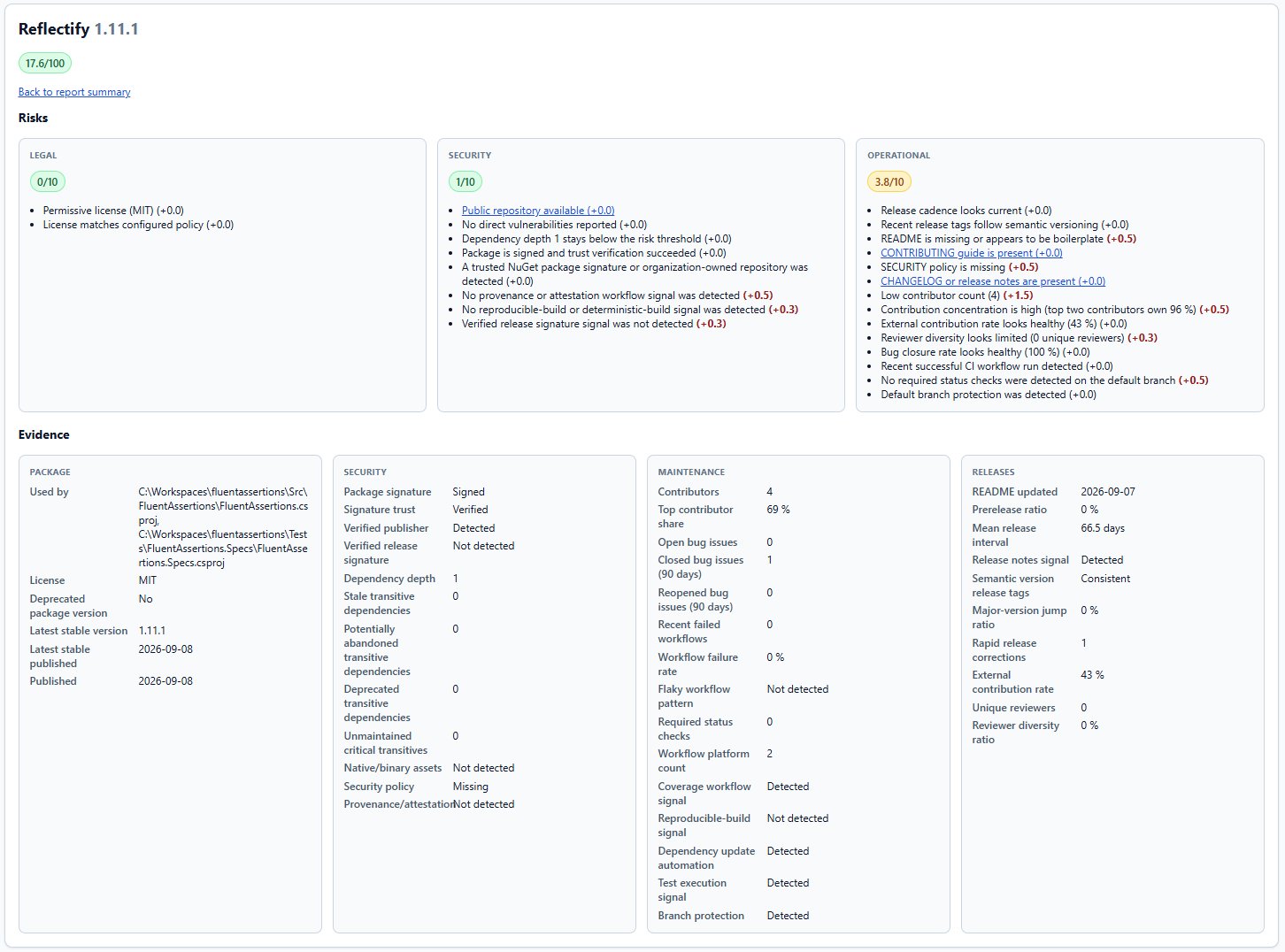
Example HTML report sections:
- Project path and generation timestamp
- Overall status, known-vulnerability count and low/medium/high package counts
- Package summary table with clickable package names and versions, and a Vulnerabilities column
- Dependency Hygiene section
- Package details cards with:
- overall score
- legal, security and operational sub-scores
- scoring rationale
- the vulnerability count next to the score
- collected evidence, grouped into Package, Security, Maintenance and Releases cards, such as license, repository, release, maintainer, CI and dependency signals
Dependency hygiene
Dependency hygiene is about the shape of your dependency graph rather than the quality of individual packages. It looks for two things:
- Redundant references - a direct
PackageReferencethat a referenced project or another direct package already provides. - Version conflicts - one package that resolves to different versions in different projects.
Unlike the legal, security and operational dimensions, hygiene is not scored. It is reported next to the scores so you can
act on it without it distorting them. Use the dependencies command to run the check on its own.
Dependency hygiene in the report
When the report covers NuGet projects, the HTML report also gets a Dependency Hygiene section. It lists the
redundant package references and the version conflicts found in the restore graph, the same findings that the
dependencies command reports. The data comes from the restore output PackageGuard already
loaded for the scan, so it adds no extra restore and no network access.
These findings are not part of the risk score. They never change a package's score, the risk zone counts, the overall report status, or the exit code. The SARIF report does not include them.